


Excel Tabellen verknüpfen und automatisch aktualisieren
Excel Tabellen zusammenführen – und deren Daten aktualisieren lassen
Oft werden Daten der einen Excel Tabelle in einer anderen Excel Tabelle (oder alternativ auf einem neuen Tabellenblatt) benötigt. Vielleicht haben Sie bisher mühsam und äußerst zeitaufwendig die Daten neu eingetippt. Vielleicht haben Sie auch per Copy-Paste-Tastenkombination die Werte übernommen. Beide Lösungen sind unbefriedigend – und bergen oftmals das Risiko, dass Sie Zahlen übersehen.
Eine effektivere Lösung bietet Excel: Sie können per Mausklick die jeweiligen Tabellen (oder Tabellenblätter) miteinander verbinden. Die Originaldaten werden aus der sogenannten Quellmappe (oder Quelltabelle bzw. Quellzelle) per Excel-Verknüpfung in die Zielmappe übernommen. Die Verknüpfung wird mit Hilfe einer Formel und einem externen Bezug in der Zelle der Zieltabelle erstellt – also genau in der Zelle, in der die Daten aus der Quelltabelle übernommen werden sollen. Der Clou solcher Excel-Verknüpfungen: Diese lassen sich automatisch aktualisieren.
In Excel Verknüpfung zwischen Tabellen erstellen: Schritt für Schritt
- Öffnen Sie Ihre Quelltabelle und danach Ihre Zielmappe. Vielleicht müssen Sie Ihre Tabelle, die als Zielmappe fungiert, auch mit Excel erst erstellen. Dann tun Sie dies.
- Klicken Sie in der Zielmappe auf die Zelle, in der zukünftig die Daten aus der Quelltabelle angezeigt werden sollen. Im Beispiel ist dies die Zelle B1.
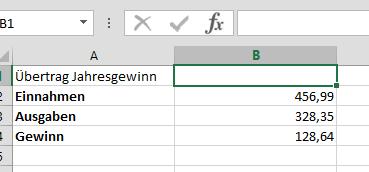
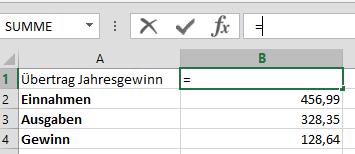
- Damit Excel die Tabelle verknüpfen kann, muss die Zelle ein Gleichheitszeichen enthalten. Geben Sie dies in die Zelle ein. Dadurch werden in Excel die Formeln zur Verknüpfung aktiviert.
- Öffnen Sie die Registerkarte Ansicht. Klicken Sie dort in der vierten Gruppe Fenster auf den Befehl Fenster wechseln.
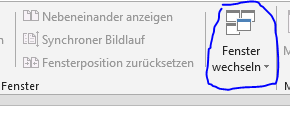
- Im Dropdown-Menü wählen Sie Ihre Quelltabelle. Excel wechselt dann zu dieser und zeigt Sie auf Ihrem Bildschirm an.
- Markieren Sie nun die Zelle in Ihrer Quelltabelle, deren Daten übernommen werden sollen. Excel setzt sofort einen Rahmen um diese (im Beispiel die B3). Gleichzeitig fügt Excel den Bezug zur Quellzelle als absoluten Bezug in eine Formel ein.
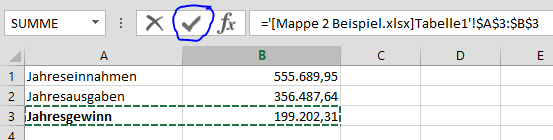
- Mit einem Drücken der Eingabetaste beenden Sie die Formelerstellung. Alternativ können Sie auch die Schaltfläche Eingeben (das kleine Häkchen) betätigen.
- Excel löscht den Rahmen und wechselt sofort zur Zielmappe: Die Verknüpfung wurde erfolgreich – und automatisch - durchgeführt.
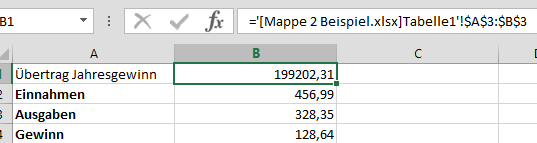
Tipp: Wollen Sie Zellen Ihrer Tabellenblätter verknüpfen, wiederholen Sie die obigen Schritte. Statt allerdings zwischen den Tabellen zu wechseln, klicken Sie nur auf den in Excel unten angezeigten Reiter. Wechseln Sie also vom Zieltabellenblatt zum Quell-Tabellenblatt.

Excel Tabellen automatisch aktualisieren
Manches Mal werden allerdings die Daten in der Quellzelle geändert.
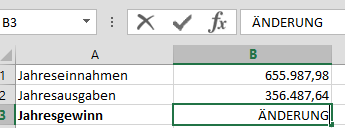
Kein Problem. Lassen Sie Excel die Werte in den Zellen der Zielmappe aktualisieren. Öffnen Sie dafür einfach Ihre Zieltabelle. In Excel 2013 wird die Änderung automatisch eingefügt.
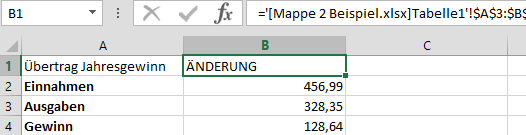
In Excel 2010 werden Sie in einem Menüfenster gefragt, ob Excel die Datei aktualisieren oder nicht aktualisieren soll. Klicken Sie den gewünschten Befehl an.
- Kommentieren
- 447352 Aufrufe






Kommentare
Excel Tabellen verknüpfen und automatisch aktualisieren
It's generally advisable to consult a healthcare
professional before taking any medication, including decongestants, after
a concussion.
Also visit my page penis enlargement at home
Excel Tabellen verknüpfen und automatisch aktualisieren
This is a topic that is near to my heart...
Thank you! Exactly where are your contact details though?
My web site: Baca Artikel Lengkap
Excel Tabellen verknüpfen und automatisch aktualisieren
Outstanding post however I was wanting to know if you could write a litte more on this subject?
I'd be very grateful if you could elaborate a little bit more.
Thank you!
Also visit my blog; Cek Selengkapnya
Excel Tabellen verknüpfen und automatisch aktualisieren
Great blog! Do you have any hints for aspiring writers?
I'm hoping to start my own site soon but I'm a little lost on everything.
Would you recommend starting with a free platform like Wordpress or go for a
paid option? There are so many choices out there that I'm completely confused ..
Any ideas? Bless you!
Feel free to visit my page - Link Panduan
Excel Tabellen verknüpfen und automatisch aktualisieren
Hello there! This post could not be written any better!
Reading this post reminds me of my old room mate! He always kept chatting about this.
I will forward this post to him. Pretty sure he will have a good
read. Thank you for sharing!
Also visit my web-site :: Artikel Inspirati
Excel Tabellen verknüpfen und automatisch aktualisieren
wonderful submit, very informative. I wonder why the opposite experts of this sector do not understand this.
You must proceed your writing. I'm confident,
you've a huge readers' base already!
my blog; Update Guide
Excel Tabellen verknüpfen und automatisch aktualisieren
Have you ever considered writing an e-book or guest authoring on other
websites? I have a blog based on the same subjects you discuss and would love to have you share some stories/information. I know my readers
would value your work. If you're even remotely interested, feel
free to shoot me an e-mail.
My site; Data HK Lengkap
Excel Tabellen verknüpfen und automatisch aktualisieren
This article will assist the internet people for setting up
new blog or even a weblog from start to end.
Check out my site :: Panduan Terbaik
Excel Tabellen verknüpfen und automatisch aktualisieren
Peculiar article, just what I wanted to find.
My blog post: Link Rekomendasi
Excel Tabellen verknüpfen und automatisch aktualisieren
I really like what you guys tend to be up too.
Such clever work and coverage! Keep up the amazing works guys I've
incorporated you guys to our blogroll.
Here is my web page ... Info Menarik Lainnya